Minecraft Classic
Play Minecraft Classic for free on your browser. Explore, build, and create in a limitless sandbox world without downloading. Available at https://randomgame.click.
All-time best-selling game Minecraft is now available on your browser for free. Minecraft Classic is a player-driven sandbox game with limitless creativity. If you enjoy games that boost creativity, this game has a lot to offer. This version of Minecraft is packed with details, options, and features, ensuring you won't miss any aspect of the original game.
You are free to dig, carve, and build whatever you like: a mansion for yourself or an entire new city. It's all in your hands.
There are no monsters, enemies, or urgency to gather resources. Take it easy and discover the stress-free world of crafting.
You can play this game, which consists of a creative mode of Minecraft, for free on RandomGame.click without downloading a single file.
How to Play Minecraft Classic?
- Open Minecraft Classic on RandomGame.click and start generating a new level.
- Choose between two types of land: Flatgrass and Vanilla.
- Flatgrass is an open world on a large flat map filled with grass, as the name suggests.
- The Vanilla Map offers a more diverse environment with plants, lakes, and even a beach.
- After entering the map, feel free to explore every part of it. Left-click to break and right-click to build blocks. A detailed list of controls is available at the bottom of this page.
- Minecraft Classic is highly customizable. You can change graphics, texture packs, hotkeys, and even the color of the clouds to your preferences.
- Nostalgia options allow you to experience pre-classic Minecraft in terms of both functionality and appearance.
- Head over to the options menu to discover all the alternatives in this fantastic crafting game.
Explore, Imagine, and Build Your Dreams
- There are no levels or missions to accomplish. The sky is the limit in Minecraft Classic.
- Explore a large map filled with numerous kinds of blocks.
- Decide where and what you'd like to build. You have 65 different types of materials to choose from.
- Don't worry about running out of materials. You have unlimited resources in this game.
Blocks, Mines, Plants Options
- Access the blocks menu by pressing B while playing. All block types are listed below. Choose your favorites and add them to your favorites to use with hotkeys.
- Blocks, mines, and other building materials include: Stone (1), Grass (2), Dirt (3), Cobblestone (4), Wood (5), Sapling (6), Bedrock (7), Water (8), Still Water (9), Lava (10), Still Lava (11), Sand (12), Gravel (13), Gold Ore (14), Iron Ore (15), Coral Ore (16), Log (17), Leaves (18), Sponge (19), Glass (20), Dandelion (37), Rose (38), Brown Mushroom (39), Red Mushroom (40), Gold (41), Iron (42), Double Slab (43), Slab Brick (44), TNT (45), Bookshelf (46), Mossy Rocks (47), Obsidian (48), Cobblestone Slab (49), Rope (50), Sandstone (51), Snow (52), Fire (53), Ice (60), Ceramic Tile (61), Magma (62), Pillar (63), Crate (64), Stone Brick (65).
- Color blocks include: Red (21), Orange (22), Yellow (23), Lime (24), Green (25), Teal (26), Aqua (27), Cyan (28), Blue (29), Indigo (30), Violet (31), Magenta (32), Pink (33), Black (34), Gray (35), White (36), Light Pink (55), Forest Green (56), Brown (57), Deep Blue (58), Turquoise (59).
Don't Forget to Save Your Progress
- After playing for a while, save your progress in your browser cache or download it to your computer.
- To save, press ESC, open the menu, and hit the 'save level...' button. Create a name for your level to keep it in the cache, or download it to your computer.
- Next time, continue where you left off by loading the .cw file.
How to Place Blocks in Minecraft Classic?
Press B and choose the type of block you want to construct in the inventory. Decide where to place the block and right-click there to build.
Can You Fly in Minecraft Classic?
Yes, you can. Press the Z key to fly. Use Q and E to move up and down while flying. You can also maximize jump height in the hacks menu for an extremely high jump, similar to flying.
Controls
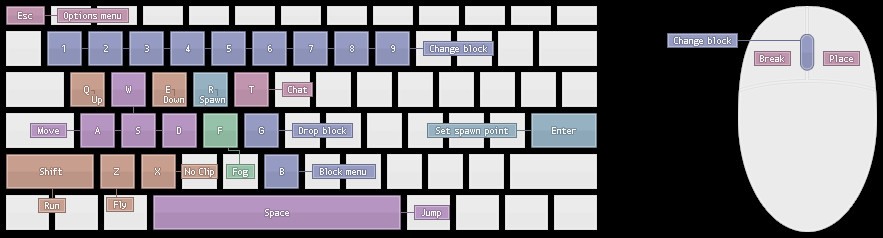
- WASD: Move
- Left-Shift: Run
- Left-Click: Break
- Right-Click: Place
- Z: Fly
- Q and E: Up and down while flying
- X: Glitch through solid structures
- Spacebar: Jump
- G: Drop blocks
- B: Open inventory
- T: Open the chat menu
- R: Spawn
- Enter: Set a spawn point
- 1-9 or scroll: Switch between blocks
- ESC: Open the menu
- T: Toggle fog
More Games Like Minecraft Classic
Minecraft is so influential that it gave birth to a whole new genre of online games. If you'd like to try modes of Minecraft other than sandbox, play MiniBlox.io in survival mode. There are plenty of games you might also enjoy in Crafting Games and other Block Based Games. Follow the links to explore and enjoy for free on RandomGame.click.
Recommend